
Скачать Cigati VCF to CSV Converter – Бесплатный инструмент конвертации VCF в CSV для Windows
Ищете надёжный и бесплатный способ конвертировать файлы VCF в формат CSV? Cigati VCF to CSV Converter — это лёгкое, удобное Windows‑приложение, разработанное для упрощения управления контактными данными. Разработанное компанией Cigati Solutions, это мощное средство позволяет пользователям без усилий преобразовывать файлы VCF (vCard) в CSV (Comma‑Separated Values), упрощая импорт контактов в таблицы, почтовые клиенты или CRM‑системы. Независимо от того, переносите ли вы контакты со старого телефона, делаете резервную копию данных или готовитесь к обновлению системы, это бесплатное программное обеспечение обеспечивает плавный, безопасный и эффективный процесс конвертации. Без скрытых платежей и с минимальными системными требованиями, Cigati VCF to CSV Converter подходит как новичкам, так и продвинутым пользователям, ценящим простоту и производительность.
Ключевые особенности Cigati VCF to CSV Converter
The Cigati VCF to CSV Converter stands out in the crowded field of file conversion tools due to its specialized focus on contact data. Unlike generic file converters, this software is built specifically for handling vCard (.vcf) files—commonly used for storing contact information across platforms like Android, iPhone, and Outlook. One of its most compelling features is its ability to preserve all contact details during conversion, including names, phone numbers, email addresses, addresses, birthdays, and custom fields. This ensures that no data is lost during the transfer process, which is critical when managing important personal or business contacts.
Another standout feature is the batch conversion capability. Instead of converting one VCF file at a time, users can select multiple files and process them all in a single session. This is a major time-saver for users who have hundreds of contacts to manage. The interface is clean and intuitive, with drag-and-drop functionality that allows users to quickly add files without navigating complex menus. The output is saved in a standard CSV format, ensuring compatibility with Excel, Google Sheets, Mailchimp, and other popular applications.
Security is also a priority. The software runs locally on your machine—no data is uploaded to external servers—making it a secure choice for handling sensitive contact information. It’s also completely free to download and use, with no ads, no trial restrictions, and no watermarking. Regular updates ensure compatibility with new VCF formats and improve performance, keeping the tool future-ready. With features like customizable output paths, error logging, and support for Unicode characters, Cigati VCF to CSV Converter delivers a comprehensive solution for anyone needing to convert contact files efficiently and safely.
How to Install and Use Cigati VCF to CSV Converter
Installing and using Cigati VCF to CSV Converter is a straightforward process, even for users with minimal technical experience. Begin by downloading the software from the official website. The installer is a small, portable executable file (under 10 MB), which means it doesn’t require a lengthy installation process. Simply run the .exe file and follow the on-screen prompts. There are no additional toolbars, bundled software, or pop-ups—just a clean, focused setup.
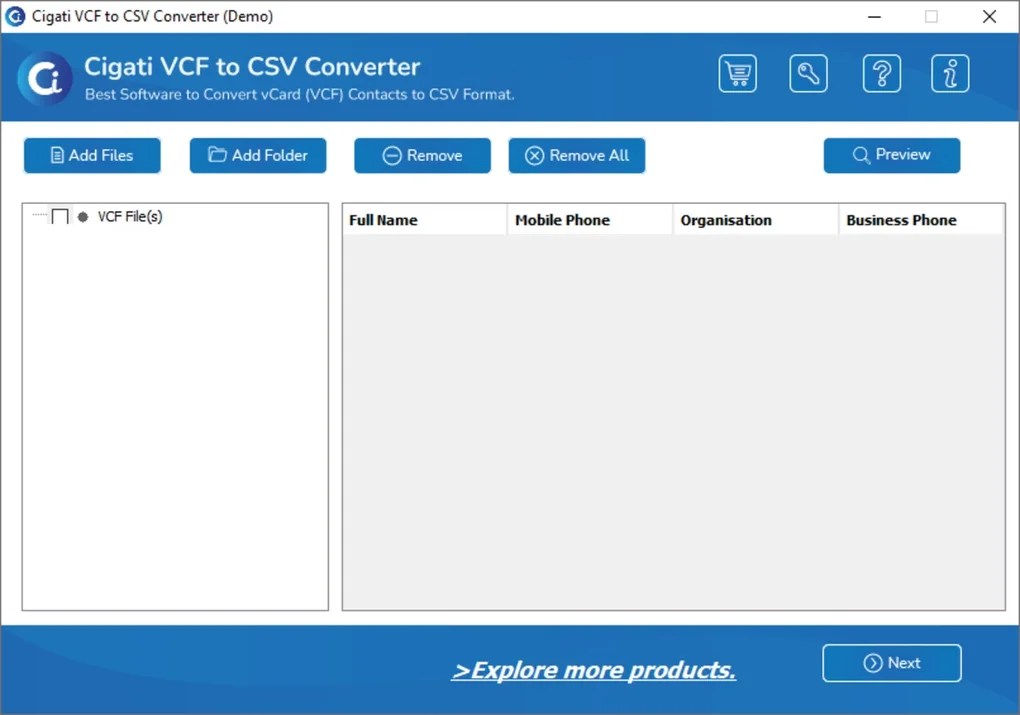
Once installed, launch the application. The main window presents a simple interface with a prominent “Add Files” button. Click it to browse your computer and select one or multiple VCF files.
Alternatively, you can drag and drop files directly into the app window. After adding your files, you’ll see a preview of the contact data that will be converted. This preview helps ensure accuracy before processing.
Next, choose the destination folder where you want the resulting CSV files to be saved. You can also rename the output file or keep the original name. Once everything is set, click the “Convert” button.
The software processes the files quickly, displaying a progress bar and a success message upon completion. You can then open the generated CSV file in Excel, Google Sheets, or any other spreadsheet program to verify the data. For advanced users, the tool supports command-line execution, allowing automation through scripts for bulk processing in enterprise environments.
It’s worth noting that the converter handles corrupted or malformed VCF files with grace, often extracting usable data even from incomplete files. This resilience makes it a dependable tool for real‑world scenarios where data integrity isn’t always guaranteed. Overall, the user experience is seamless, fast, and hassle‑free—perfect for anyone needing a no‑frills solution to manage contact data.
Compatibility and System Requirements
Cigati VCF to CSV Converter is designed exclusively for Windows operating systems, making it ideal for users on desktops and laptops running Windows 7, 8, 10, or 11. It does not currently support Mac, Android, or iOS platforms, so users on these systems will need to rely on alternative solutions or use a Windows virtual machine. However, for the majority of Windows users—especially those managing contacts from older smartphones or legacy systems—this tool offers excellent compatibility.
The software has minimal system requirements, which is one of its biggest advantages. It runs smoothly on machines with as little as 1 GB of RAM and a 1 GHz processor. The disk space required is less than 20 MB, meaning it won’t strain your system or slow down other applications. Since it’s a standalone executable, there’s no need to install additional libraries or frameworks like .NET or Java, which simplifies deployment across multiple devices.
Despite its lightweight nature, the tool performs reliably even with large VCF files containing thousands of contacts. It efficiently parses the vCard format, including multi-line fields and special characters, ensuring accurate data extraction. The software also supports Unicode encoding, which is crucial for handling international names and characters from non‑Latin scripts. This makes it a versatile tool not just for English‑speaking users but for global audiences as well.
For IT administrators managing multiple workstations, the portable nature of the app allows for easy deployment via USB drives or internal network shares. No administrative rights are required for basic use, which enhances its usability in restricted environments. Regular updates are released by Cigati Solutions to maintain compatibility with evolving VCF standards and to fix any reported bugs, ensuring long‑term reliability.
Pros and Cons: Is Cigati VCF to CSV Converter Right for You?
- Pros:
- Completely free to download and use with no hidden costs
- Fast and reliable batch conversion of multiple VCF files
- Preserves all contact details including custom fields and addresses
- Local processing ensures data privacy and security
- Simple, intuitive interface suitable for beginners
- Supports Unicode and international characters
- Lightweight with minimal system requirements
- Regular updates and bug fixes from the developer
- Cons:
- Only available for Windows (no Mac, iOS, or Android versions)
- Limited to VCF to CSV conversion (no support for other formats like PDF or Excel)
- No built-in preview of the final CSV output before conversion
- Command-line mode may be challenging for non-technical users
FAQ: Frequently Asked Questions
Is Cigati VCF to CSV Converter safe to download?
Yes, Cigati VCF to CSV Converter is safe to download and use. The software is developed by Cigati Solutions and distributed through official channels without malware, ads, or bundled programs. It runs entirely on your local machine, so your contact data never leaves your device.
Can I convert multiple VCF files at once?
Yes, the tool supports batch conversion. You can select multiple VCF files at once and convert them into separate CSV files or combine them into a single output file, depending on your needs.
Does the converter preserve all contact information?
Yes, the converter retains all standard and custom contact fields such as names, phone numbers, email addresses, addresses, birthdays, and notes. It also handles Unicode characters correctly, ensuring international names are preserved.
Is there a Mac or mobile version available?
Currently, Cigati VCF to CSV Converter is only available for Windows. There are no official versions for Mac, iOS, or Android. However, users on other platforms can use virtual machines or online converters as alternatives.
Can I use this tool for business contact management?
Absolutely. Many businesses use this tool to migrate contacts from old devices to CRM systems, export data for marketing campaigns, or back up contact lists. Its batch processing and secure local execution make it ideal for professional use.
Conclusion: Why You Should Download Cigati VCF to CSV Converter Today
If you’re dealing with VCF files and need to convert them to CSV for use in spreadsheets, email marketing tools, or CRM platforms, Cigati VCF to CSV Converter is an excellent choice. It’s free, secure, fast, and built with real user needs in mind. Whether you're backing up your phone contacts, migrating data between devices, or preparing for a system upgrade, this tool delivers reliable results without any hassle.
With its intuitive interface, batch processing, and strong data preservation, it stands out as one of the best free VCF conversion tools available for Windows. While it lacks cross-platform support, its performance and reliability more than compensate for this limitation. For anyone seeking a no-cost, no-compromise solution to manage contact data, this software is a must-have.
Download Cigati VCF to CSV Converter now and take full control of your contact information—secure, fast, and completely free.







